If you've ever tried to automate anything across Twitter/X, Reddit, and email at the same time, you already know the wall you hit. Puppeteer gets fingerprinted. Playwright gets blocked. Headless Chrome trips Reddit's bot detection before you even get to page two.
OpenClaw is a bit different but runs into its own version of the same problem. Its browser automation works through a Browser Relay extension, so for the agent to actually control a browser, that extension has to be running, which means you have to be at your computer. The moment you close your laptop, the workflow just stops. And if the browser crashes or the relay disconnects while you're away? The whole task dies mid-run with no recovery, and you won't even know until you're back and checking why nothing happened. The headless browser fallback doesn't save you here either since Twitter and Reddit block that the same way they block Playwright.
People on r/AI_Agents who've actually run OpenClaw for a while have landed at the same conclusion. One comment that stuck with us: "I'd say it's useful, but not in the 'set it and forget it' way people hype it up." That's the honest take. OpenClaw is not at the set-it-and-forget-it stage yet, and for a daily cron job that's supposed to run whether you're at your desk or not, that gap matters a lot.
You can throw residential proxies at the rate-limiting problem, but now you're paying for extra infrastructure that still breaks when a platform updates something, and you've added yet another thing to maintain.
The frustrating part is that the task itself is genuinely simple. Every morning, go through the relevant corners of the internet, find what matters about AI agents, and put it somewhere readable. The logic isn't hard. The problem is that every tool that tries to do this programmatically ends up looking like a bot to the platforms it's hitting.
| Approach | The problem |
|---|---|
| OpenClaw Browser Relay | Needs you at your computer, crashes mid-run if relay disconnects |
| Puppeteer / Playwright | Fingerprinted as headless, blocked by Twitter and Reddit |
| Headless Chrome | Same fingerprinting issue, platforms detect and cut access |
| Residential proxies | Cost money, still get rate-limited, another layer to maintain |
| bot0 + dom0 | Uses your real session cookies, runs unattended, platforms see normal browsing |
The reason dom0 gets through where everything else doesn't is that it opens a browser using your actual session cookies. So to Twitter and Reddit it just looks like you opening a tab, and since it's running off your real login state there's nothing unusual for those platforms to flag. That's what makes the cron job actually hold up over time, because every morning when it runs those platforms have no reason to treat it any differently than your normal browsing session.
So instead of fighting all of that, we just told bot0 what we wanted and let it work it out.
The Prompt
We kept it deliberately vague to see how bot0 would handle the gaps:
"Run a daily cron job at a set time every morning, go through our Twitter/X, Reddit, emails, and key newsletters, then generate a single clean dashboard summarizing everything important about AI agents."
We didn't specify any tools or list out the sources beyond the obvious ones. Just described the outcome and bot0 figured out the rest.
The 4 Minutes 30 Seconds
We recorded the whole session. Here it is compressed into a timelapse:
Here's what's happening at each stage.
Scanning What's Already There
Before asking us for anything, bot0 scanned the environment first. Connected apps, active logins, open tabs, anything already available. It found Twitter/X already connected through Composio and Gmail already linked, so two of the four sources were sorted before it even asked us a single question.
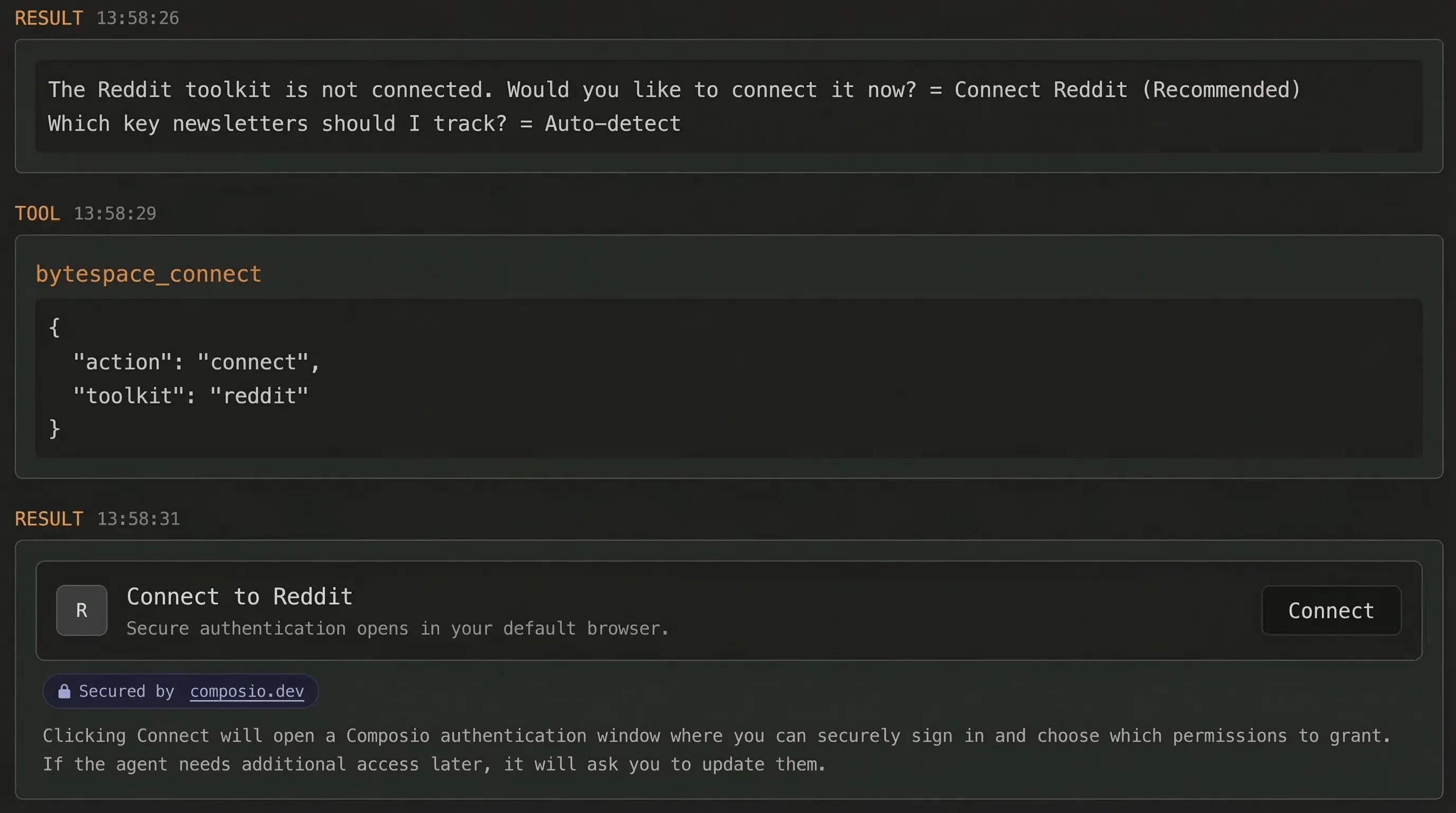
Reddit wasn't connected, so it flagged that and asked us to link it. Standard OAuth login, the same kind of popup you'd see connecting any app to Google. Done in about 30 seconds.
Finding the Right Newsletters
We didn't tell it which newsletters to pull from. bot0 went through our Gmail subscriptions, figured out which ones were actually relevant to the AI agents query, and picked them on its own. We didn't have to point it anywhere or set up any filters, it just found them.
Running the Search
dom0 opened the browser with our session cookies and started moving through each source. Reddit first, where it found r/AI_Agents and r/aiagents and pulled the top content from the last 24 hours. Then Twitter/X, ran the query, grabbed the results. Then the newsletters it had already identified in Gmail. The whole time it was running, nothing got blocked and nothing triggered any rate limiting because from each platform's side it was just a logged-in user reading their feed.
Throughout all of this it was writing to the output file in real time, organized by source, with links and a short summary for each item.
The Output
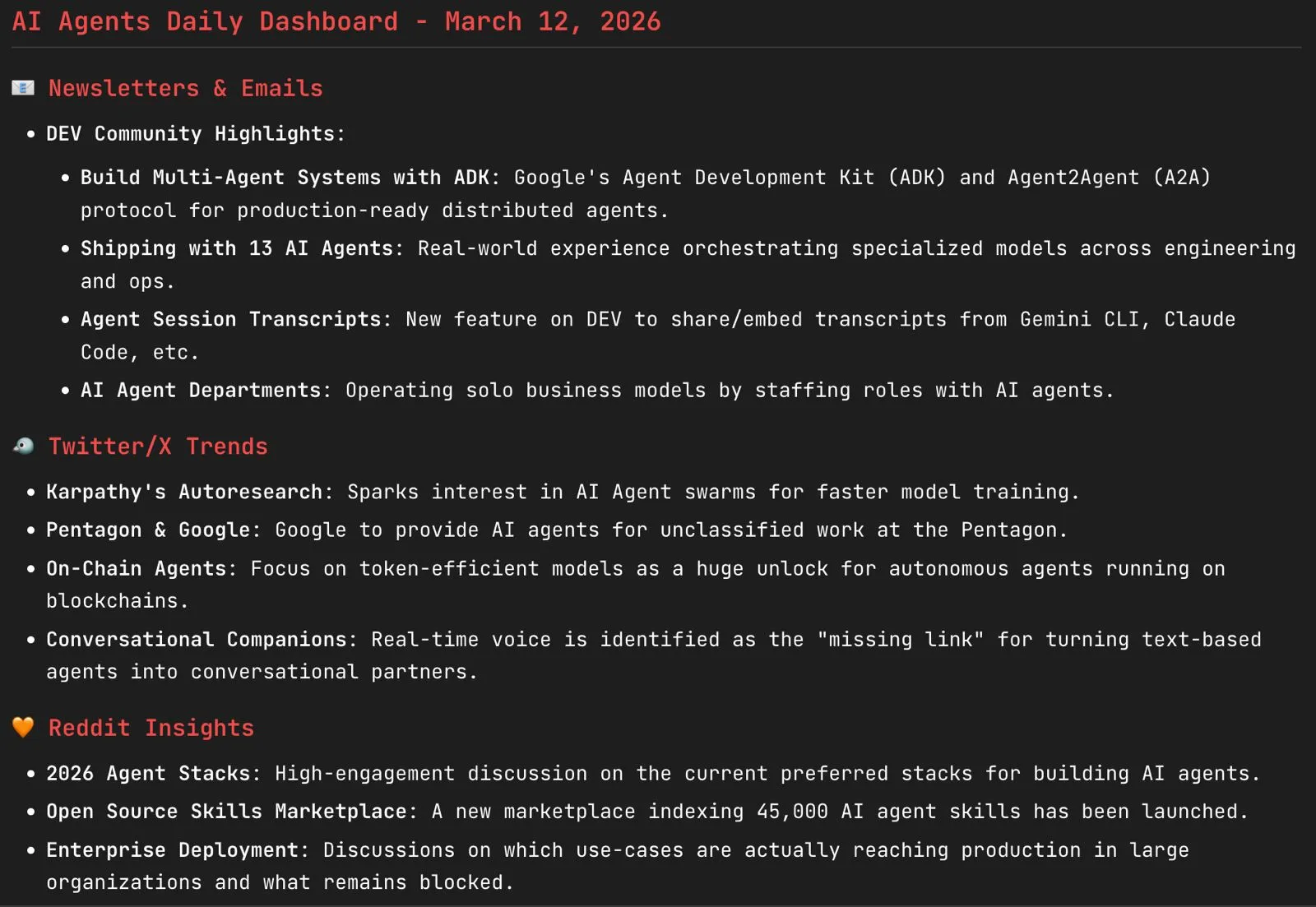
When it finished, there was a clean .md file waiting with everything in it. Top posts from both subreddits, relevant tweets, newsletter summaries, all formatted and ready to read in under a minute:
Then bot0 asked what time we wanted this to run every morning. We told it. Cron job set, and that was the whole thing.
What the Next Morning Looked Like
The file was just there when we opened the laptop. Already done, already formatted, already waiting. We didn't have to open a terminal or check if anything failed or wonder if the relay disconnected overnight. Just the summary sitting in the folder exactly like we described it.
The first run is impressive. The tenth run, when you've completely forgotten you set it up and it's still working correctly, is when it actually becomes useful.
Setting It Up Yourself
Download bot0 from bot0.dev. It's a .dmg, open it, drag it to Applications, and you're done. Connect your accounts through the integrations panel when bot0 asks, then describe your briefing in plain language covering what sources, what topic, and what time you want it to run.
FAQ
Can I use bot0 to monitor any topic, not just AI agents?
Yes. The briefing we built is specific to AI agents because that's what we needed, but the same workflow works for any topic you care about. Competitor monitoring, job listings, GitHub releases, price tracking, anything that follows a "check these sources daily and summarize what matters" pattern works the same way.
Why doesn't dom0 get blocked the way Playwright or Puppeteer does?
Because it uses your actual browser session cookies rather than spinning up a separate headless browser session. Twitter and Reddit see a normal logged-in user going through their feed, so there's nothing there for their bot detection to catch.
What about OpenClaw, can't it handle this kind of workflow?
For tasks you run manually while you're at your computer, it can. For an unattended cron job that runs every morning while you're asleep, the Browser Relay dependency is the problem. The extension needs to be active and your machine needs to be on, and if anything disconnects mid-run while you're away the task just dies with no recovery. The headless fallback gets blocked by Twitter and Reddit the same way Playwright does.
Do I need to be at my computer when the cron job runs?
No, that's the whole point. Once the cron job is set, bot0 runs on schedule and the output is waiting when you open your laptop.
What if Reddit or Twitter change their layout and break the workflow?
dom0's self-healing handles most structural changes on its own, so the cron job keeps running without you having to go in and fix selectors or update anything.
Can I pull from sources beyond Twitter, Reddit, and email?
Yes. bot0 can navigate any site dom0 can access, which is basically any site you can open in a normal browser session. Just include it in your prompt.
Is bot0 Mac-only right now?
Yes, Apple Silicon and Intel both supported. Windows and Linux builds are in progress.
Does it work with models other than Claude?
Yes. BYOK means you bring your own API key and it works with Anthropic, OpenAI, and other major providers.