There's a pattern with autonomous AI agents that's gotten pretty predictable by now. Someone posts a demo, the agent looks incredible for three minutes, and then you try it yourself and spend the next two hours debugging why it broke on page two of Craigslist. OpenClaw is a good example of this dynamic. It blew up on GitHub, got 145k stars in weeks, and the demos were genuinely impressive. But anyone who actually tried to run a multi-step workflow on it knows that impressive and reliable are two very different things. You need to configure the gateway daemon, set up Browser Relay manually for any browser automation, wire up your own credentials, and then hope nothing on the target website changed since the last run. When something breaks, and it will, you're the one fixing it.
This isn't a knock on the OpenClaw team. The project is well-built and the community moves fast. But there's a real gap between "agent that can do things" and "agent that will reliably finish a task you assigned it three days ago while you were doing something else."
That gap is exactly what we built bot0 to close. So we gave it a task that would expose any cracks immediately: find us an apartment in San Francisco. Not just surface some listings, but actually handle the whole thing. Search every relevant platform, shortlist what matches our criteria, email the landlords, track everything in a spreadsheet, and keep going every day until a deal closes. The whole run took 18 minutes and here's exactly what it did.
The Prompt
Here's exactly what we gave it:
"Find an apartment in San Francisco completely on your own. Scan listings on Zillow, Craigslist, Facebook groups, and Twitter. Shortlist the ones that fit our criteria, email the agents and landlords, track everything in a spreadsheet, and set up a daily search so we don't miss anything until the deal is finalized."
bot0 came back with a few clarifying questions about budget range, preferred neighborhoods, how many bedrooms, and move-in timeline. Once we answered those, it started moving.
The 18 Minutes
We recorded the whole session and compressed it into a one-minute timelapse so you can see what bot0 was actually doing the entire time:
The video moves fast, so let's break down what's happening at each stage.
Connecting Gmail and Google Sheets
The first thing bot0 did was tell us what it needed. It asked us to connect Gmail for outreach and Google Sheets for tracking. One click, standard Google OAuth. No need of developer console, client IDs, none of that just to connect Gmail.
Hunting Across Every Platform
This is where dom0 takes over the browser and starts working through platforms one by one.
Craigslist first. bot0 ran targeted searches filtered by our criteria and pulled every matching listing, not just the URLs but the neighborhood, price, layout, listed amenities, and contact email where available. Then Zillow. Then Facebook Marketplace and Facebook groups for SF apartment rentals. Then Twitter/X, which is genuinely underrated as a listing source in expensive cities where landlords post directly to dodge platform fees.
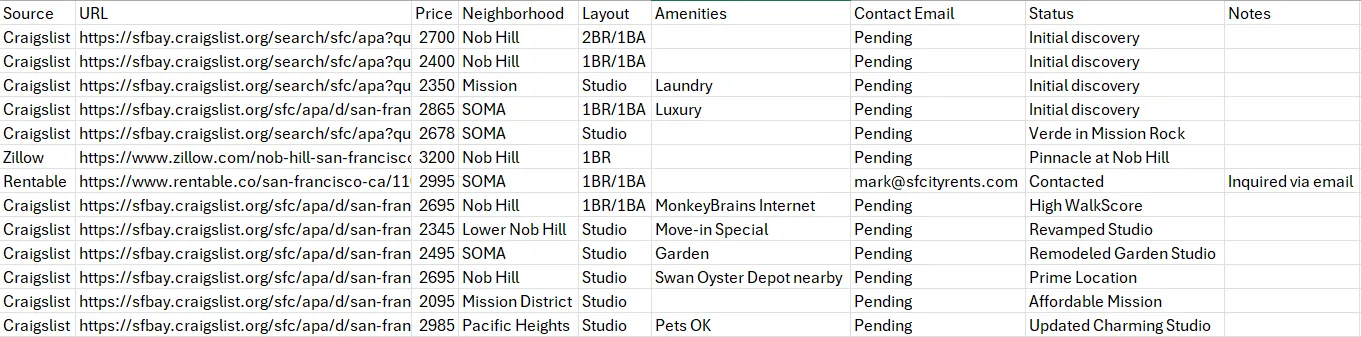
Throughout all of this it was writing to the spreadsheet in real time. Every listing went in immediately with source, URL, price, neighborhood, layout, amenities, contact info, and status. By the end of the run it had tracked 12 plus listings across multiple sources:
One thing worth understanding about how the browser automation actually works here, because it's relevant to whether this stays useful over time: most browser automation breaks the moment a website does a minor redesign. Your script was targeting a button with selector listing-contact-btn, the site renames it contact-action-primary, and the whole thing falls over. dom0 avoids this by using Chrome's native debugging protocol to understand what an element is and what it does rather than just what it's called in the DOM. So when Craigslist or Zillow reshuffles their layout, dom0 adapts in real time instead of throwing an error. For a workflow that's supposed to run daily for weeks, that distinction is the whole ballgame.
Sending the Emails
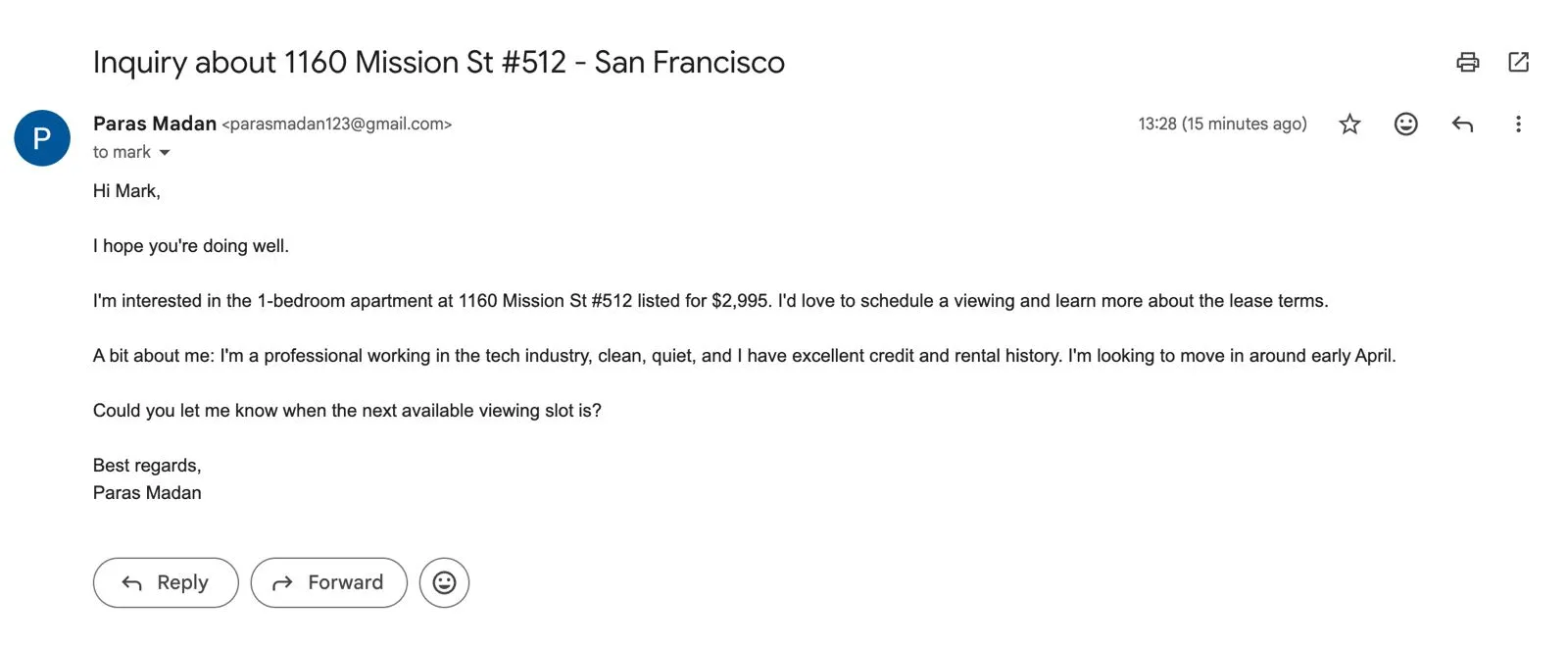
For listings where it found contact emails, bot0 drafted and sent inquiry emails with the specific listing address, the listed price, our move-in timeline, and a brief tenant intro. Here's one it sent to Mark at sfcityrents.com about the 1BR/1BA at 1160 Mission St #512:
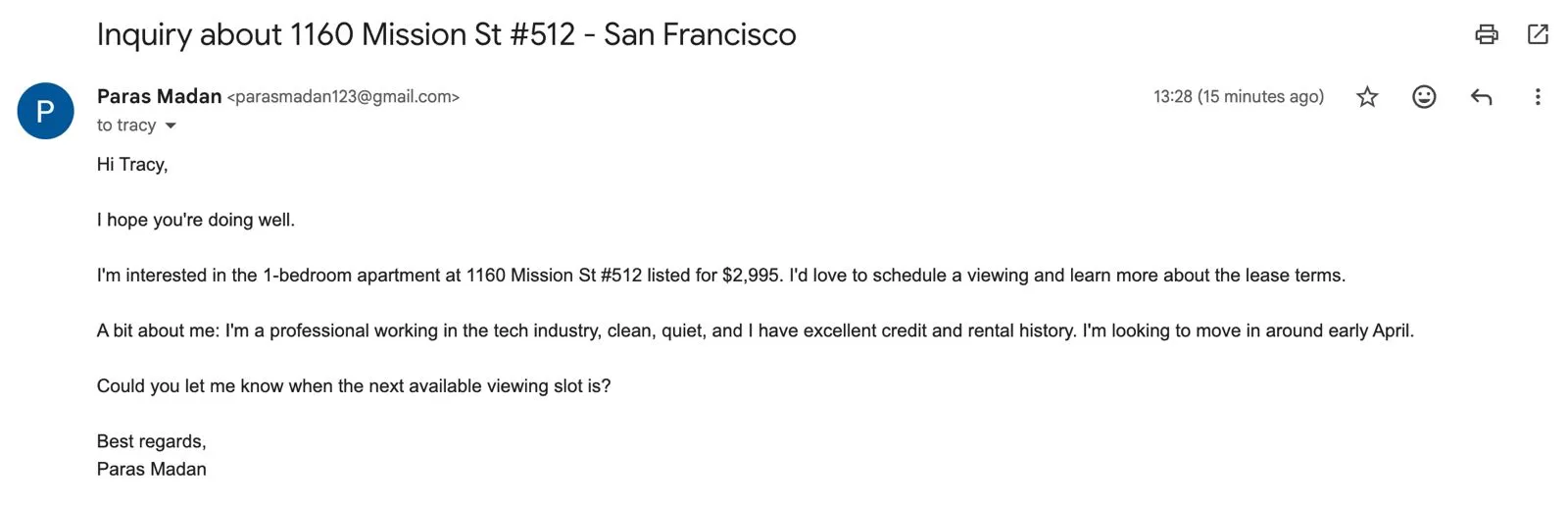
And a second one to Tracy about the same listing:
And within 10 hours, we got a reply back from Tracy at SF City Rents:
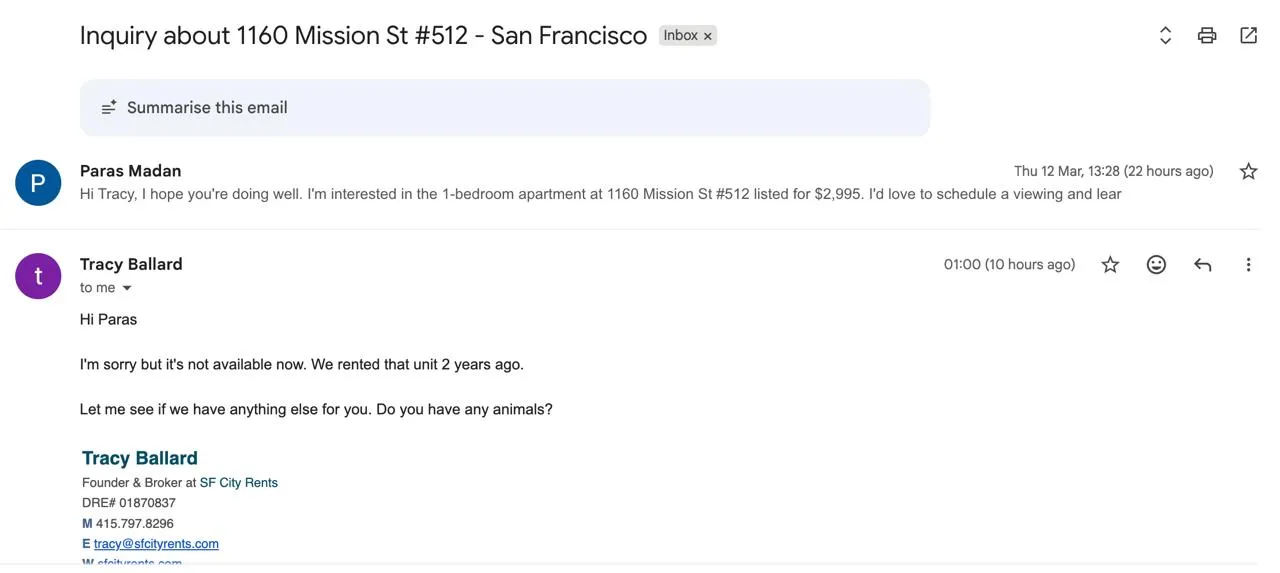
bot0's trigger is now monitoring that thread and will auto-draft a reply when we respond, keeping the workflow live until we schedule a viewing.
These went out. We didn't write a word of them.
Writing Its Own Skill
After running through everything, testing what worked, and validating the full workflow end to end, bot0 then packaged it all into a reusable skill. A skill is a structured playbook that defines the goal, the tools required, the exact steps, and the auth dependencies. This is the full sf-apartment-hunter skill it created:
---
name: sf-apartment-hunter
description: Automates the end-to-end process of finding an apartment in San Francisco:
  scanning listings, shortlisting, emailing agents, and negotiating terms.
---

# SF Apartment Hunter Skill

## Goal
Automate the end-to-end process of finding an apartment in San Francisco:
scanning listings, shortlisting options, emailing agents/landlords,
scheduling viewings, and negotiating rent and terms over email.

## Steps
1. **Define Criteria**: Budget, neighborhood, amenities, layout, move-in date.
2. **Search**: Use `websearch` and `dom0` to find listings on Zillow, Craigslist,
   Facebook Marketplace/Groups, and Twitter/X posts about available places.
3. **Extract**: Get contact info (email/phone) and full listing details from each result.
4. **Track**: Log everything to `listings.csv` with source, URL, price, neighborhood,
   layout, amenities, contact email, status, and notes.
5. **Outreach**: Use `bytespace_execute(GMAIL_SEND_EMAIL)` to send personalized
   inquiry emails to agents and landlords for shortlisted listings.
6. **Negotiate**: Use `trigger(GMAIL_NEW_GMAIL_MESSAGE)` to monitor for replies
   and auto-draft responses to negotiate terms and schedule viewings.
7. **Daily Re-run**: Enable a cron job to repeat the full search and outreach
   workflow every 24 hours until the deal is finalized.

## Tools Used
- `dom0`: Browser automation for navigating Craigslist, Zillow, Facebook, Twitter.
- `websearch`: Rapid lead discovery across the web.
- `bytespace_execute`: Gmail send for outreach emails.
- `trigger`: Autonomous reply monitoring and response drafting.
- `edit_file`: Spreadsheet tracking via Google Sheets / CSV.

## Auth Required
- `gmail`: For outreach and monitoring incoming replies.
- `google_sheets`: For real-time listing tracking.
That skill is now saved, and the cron job it set up at the end will re-run this exact playbook every day until we tell it a deal is closed. So the next time it runs, it already knows exactly what to do.
Setting Up the Cron Job
The last thing bot0 did before finishing the run was enable a daily trigger. Every 24 hours it re-runs the full skill, searches all the same sources, adds new listings to the spreadsheet, and sends emails to new contacts it finds, until we explicitly tell it to stop. Most agents hand you a result and that's the end of it. bot0 set up a system that keeps running.
Back to the OpenClaw Comparison
It's worth being specific here because the differences are practical, not just philosophical.
To run the same workflow on OpenClaw, you'd need to install it via npm, run the onboarding wizard in your terminal, configure the gateway daemon, manually set up Browser Relay for the web automation pieces, and handle your own API key wiring. That's 20 to 30 minutes of setup for someone comfortable in a terminal. For everyone else it's longer, and any time a dependency changes or a site breaks something, you're back in the terminal sorting it out.
Beyond setup, OpenClaw has had documented security issues worth knowing about. There are multiple CVEs covering token exfiltration, command injection through unescaped input, and prompt injection risks that exist specifically because the agent has broad OS-level access. Security firms have written about this publicly. The mass email deletion incident that circulated was real: a user instructed OpenClaw to organize her inbox, and despite setting safety keywords it mass-deleted her emails and she had to force-quit to stop it.
OpenClaw is powerful because it has root-level access to your system. That same thing is also what makes it risky.
With bot0, your API keys never touch the agent process. They live in a hardware-secured proxy, validated per request and signed by your device's Secure Enclave. Even if the agent process itself were somehow compromised, there's nothing in it to steal. For a workflow where the agent is sending emails from your Gmail account and reading listing data on your behalf, that security model isn't optional.
| bot0 | OpenClaw | |
|---|---|---|
| Setup | 2 minutes, no terminal | Terminal, daemon config, manual wiring |
| Security model | Hardware-secured, zero secrets on agent | Broad OS access, documented CVEs |
| Long-running tasks | Native, core design principle | Fragile without extra orchestration |
| Browser automation | dom0, self-healing, cacheable | Browser Relay, manual setup |
| Auth (Gmail, Sheets) | One-click OAuth | Manual credential configuration |
| Platform | macOS now, Windows coming | macOS, Windows, Linux |
| Open source | Tools open, core closed | Fully MIT-licensed |
If you want full source access and maximum flexibility and you're comfortable in a terminal, OpenClaw is worth knowing. If you want something that works in two minutes and reliably finishes multi-step tasks without babysitting, bot0 is the more practical path.
A Few Things Worth Knowing Before You Try It
bot0 is Mac-only right now, with Apple Silicon and Intel both supported. Windows and Linux builds are in progress.
It's BYOK, meaning you bring your own API key. Anthropic, OpenAI, and other major providers are all supported, and bot0 itself doesn't charge per LLM call.
Bytespace Cloud, which handles the managed proxy, credential vault, LLM caching, and monitoring, is $49/month. There's also a self-hosting path if you want to run the full stack yourself with complete data sovereignty.
The caching piece changes the cost picture significantly over repeated runs. dom0 and cmd0 cache browser and desktop workflows so that once bot0 has figured out how to navigate a site, reruns of that workflow don't need LLM calls for those parts anymore. The first apartment search run costs one thing. The daily re-runs cost significantly less.
FAQ
Does it work with models other than Claude?
Yes. BYOK means you use whatever API key you want. Anthropic, OpenAI, and other major providers are all supported.
How does it keep credentials safe?
Your API keys and Google OAuth tokens never touch the agent process. They live in a hardware-secured proxy and every API call is signed by your device's Secure Enclave. Full breakdown in bot0's security docs.
What happens if Craigslist changes its layout mid-run?
dom0's self-healing selectors handle most minor changes. It's not magic and a major overhaul would need a re-run, but it's far more resilient than traditional automation that breaks on any selector rename.
Can I see what bot0 is doing while it runs?
Yes. Full observability is built in so you can watch the agent's decisions, the tool calls it's making, and the data it's writing in real time. You can also review and correct anything after the run. Every run generates structured training data in the background too, which feeds into the longer-term vision of letting you fine-tune smaller models on your own workflows over time.
Is the self-hosting option fully featured?
Same features as the cloud version. You run your own proxy, vault, and monitoring stack. The self-hosting guide is in the docs.